Every character starts on a sheet. Most people print the official one, lose it, print it again, and end up with three versions of the same fighter in three different bags.
Here are the free sheets we make, what each is good at, and when to use which.
The one that fills in the browser
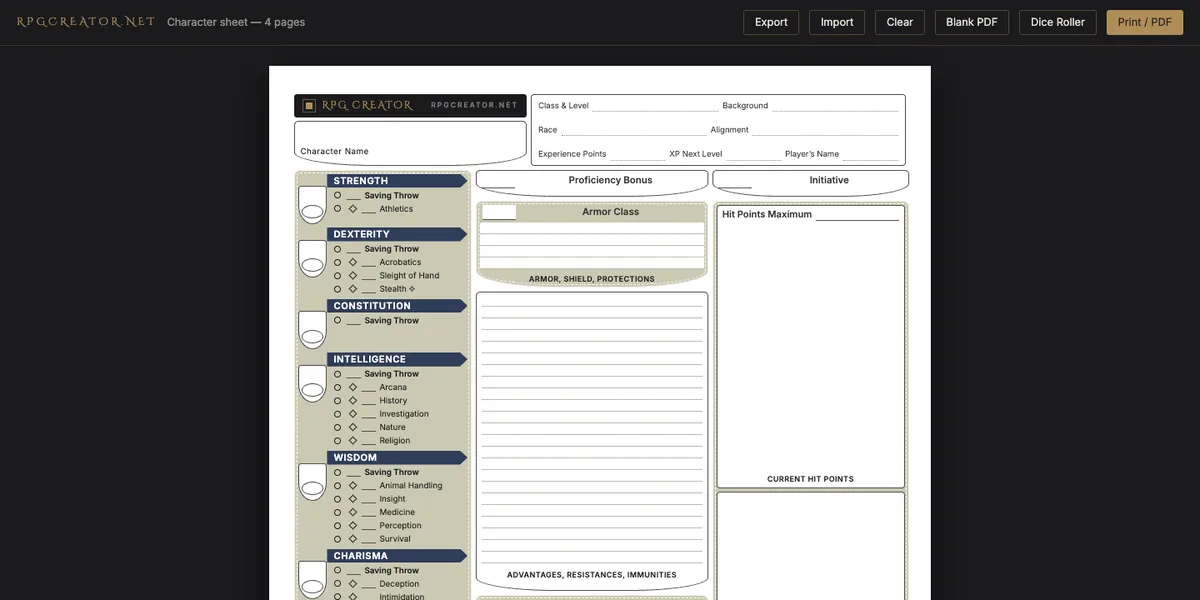
The character sheet at rpgcreator.net/sheet is four pages that fill in on screen. It works out your modifiers, saving throws, skills and Passive Perception from your ability scores and your proficiency ticks, so the arithmetic stops being your problem.
It saves to your browser as you type. No account, no email, and your character stays on your machine. Clear your browser data and the sheet goes with it, which is why there is an Export button. Print it and you get four clean A4 pages.
Use it to build a character at the table and print it after.
A character sheet is a legal document, signed in pencil and amended in coffee.
The one you can fill in any PDF reader
The fillable PDF is the same four pages with 781 form fields laid over them. Open it in Preview, Acrobat, or whatever your phone uses, type into the boxes, save the file.
A PDF cannot do arithmetic, so the modifiers are boxes you fill yourself. That is the trade: it goes anywhere, works offline, and attaches to an email.
Use it when your table swaps sheets as files, or when you want a stack of blanks for a convention.
The one that plays
The living sheet is for during the session. Every bonus on it is a button: tap Athletics and it rolls the check. It holds hit points, spells, inventory and death saves, and it has an avatar forge if you want a face on it.
RPG Creator is the bigger one: your whole roster, campaigns, encounters and quests, with the dice built in.
Both keep everything in your own browser, and both are free.
Which to use
| You want to | Use |
|---|---|
| Build a character and print it | The browser sheet |
| Fill it on a phone or email it | The fillable PDF |
| Roll from the sheet during play | The living sheet |
| Run a whole campaign | RPG Creator |
| Roll dice with your table | The 3D roller |
Filling it in: the five numbers people get wrong
The formulas below come from the System Reference Document 5.2 (the 2024 rules), "Character Creation" [1]. The browser sheet does all of them for you; the PDF trusts you.
1. Ability scores. The SRD offers three ways: the Standard Array (15, 14, 13, 12, 10, 8), 27 points to spend, or roll four d6 and keep the highest three, six times [1]. Rolled, the average score is 12.24 and an 18 turns up 1.6% of the time (counted across all 1,296 ways four d6 can land). The 3D roller has a Drop Lowest button for exactly this. Best ways to roll ability scores covers what each method does to your party.
2. Modifiers. Subtract 10, halve, round down. A 15 is +2, an 8 is −1. (It does not round up because you believe in yourself.)
3. Proficiency. At levels 1 to 4 your Proficiency Bonus is +2 [1]. Add it to the saves, skills and weapons your class and background tick, and to spell attacks and spell save DC. Nowhere else.
4. Hit points. Level 1 is the top of your Hit Die plus your Constitution modifier. After that, each level you roll the Hit Die and add Con, or take the fixed value [1]:
| Class | Level 1 HP | Each level after (fixed) |
|---|---|---|
| Barbarian | 12 + Con | 7 + Con |
| Fighter, Paladin, Ranger | 10 + Con | 6 + Con |
| Bard, Cleric, Druid, Monk, Rogue, Warlock | 8 + Con | 5 + Con |
| Sorcerer, Wizard | 6 + Con | 4 + Con |
5. The boxes people leave blank.
- Passive Perception = 10 + your Wisdom (Perception) modifier. The SRD's own example: Wisdom 15 and proficient in Perception gives 10 + 2 + 2 = 14 [1].
- Initiative = your Dexterity modifier.
- Spell save DC = 8 + spellcasting modifier + Proficiency Bonus. A level 1 wizard with Intelligence 16 has DC 8 + 3 + 2 = 13 [1].
Then pick your spells from the spell list and your first victims from the monsters.
Print the blank, fill the browser one, or play from the living sheet. They are the same sheet underneath.
Table Talk
James: Three sheets, one character. I'll lose all three.
Arthur: Which is why the browser sheet has an Export button. Use it.
James: Or I print the PDF and let the coffee stains keep score.
Arthur: The PDF trusts you with the maths. Subtract 10, halve, round down. Not "feels like a +3".
James: My 15 Strength feels like a +3.
Arthur: It's a +2. So is your Proficiency Bonus at level 1, and it goes only where your class and background tick.
James: Fine. Tip: fill in Passive Perception before the session. It's the box everyone leaves blank.
Arthur: Ten plus your Wisdom (Perception) modifier. Write it in pen.
James: In pen. On the sheet I'm about to lose.
References
- Wizards of the Coast. System Reference Document 5.2 ("Character Creation": Generate Your Scores, Level 1 Hit Points by Class, Fixed Hit Points by Class, Passive Perception, Spellcasting; "Playing the Game": Proficiency Bonus). 2025. CC-BY-4.0. https://www.dndbeyond.com/srd